Data Acceleration
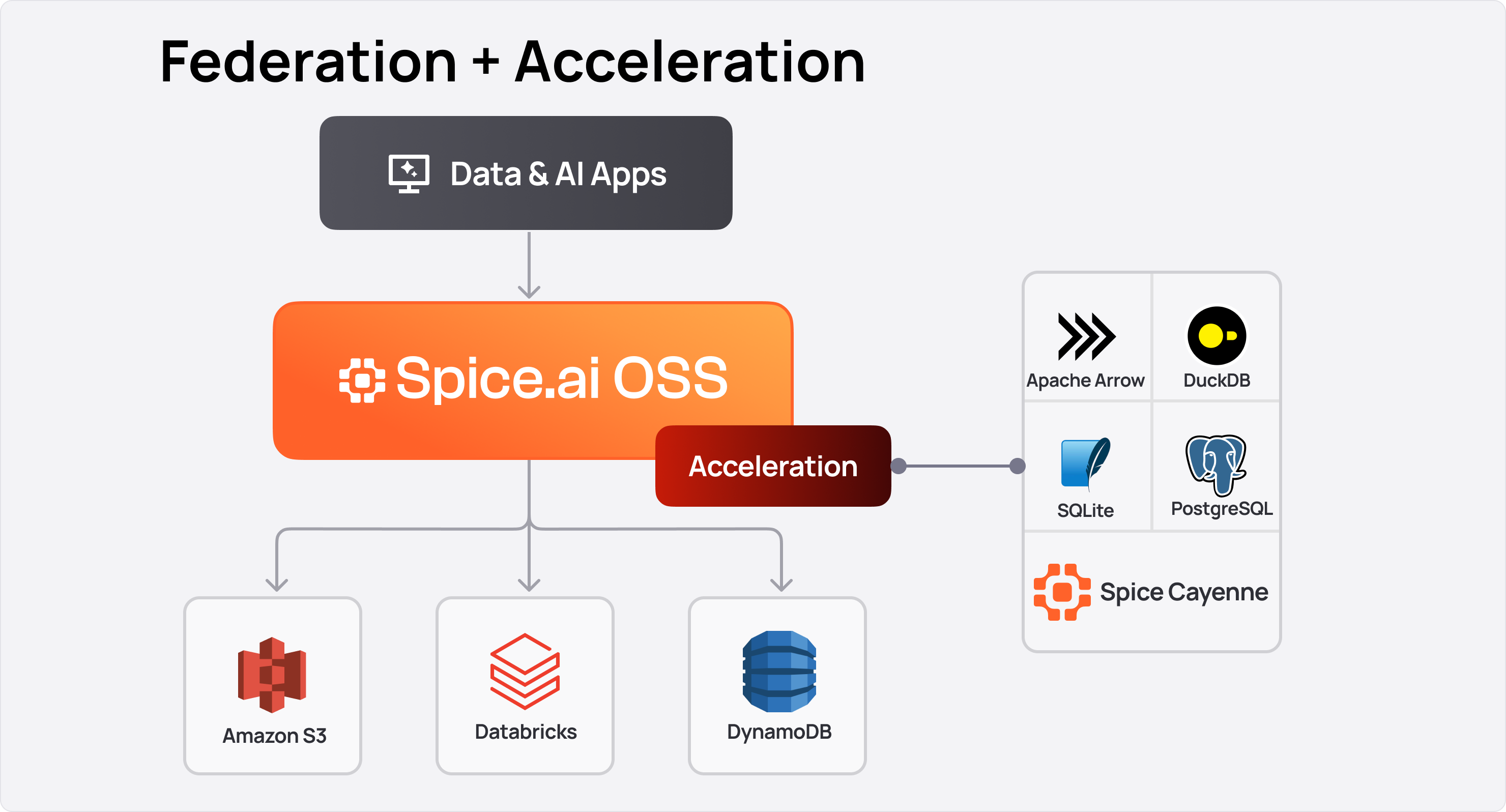
Datasets and views can be locally accelerated by the Spice runtime, pulling data from any Data Connector and storing it locally in a Data Accelerator for faster access. The data can be kept up-to-date in real-time or on a refresh schedule, ensuring deployments maintain the latest data locally for querying.
Benefits
Local data acceleration stores data alongside the application, providing faster query times by eliminating network latency. This is especially beneficial for large query results, as data transfer over the network is avoided. Depending on the Acceleration Engine used, data can also be stored in-memory, further reducing query times. Indexes can be applied to speed up certain queries.
Locally accelerated datasets can also have primary key constraints applied. This feature supports specifying actions when a constraint is violated, such as dropping the violating row or upserting it into the accelerated table.
Acceleration snapshots (preview) help file-mode accelerations become ready in seconds by bootstrapping from managed snapshots stored in object storage such as Amazon S3.
For larger datasets, partitioning splits the acceleration into smaller physical units (Hive-style files, per-partition tables, or in-memory tables) keyed by an expression. Queries that filter on the partitioning column read only the relevant partitions, dramatically reducing scan size.
Example Use Case
Consider a high-volume e-trading frontend application backed by an AWS RDS database containing a table of trades. To retrieve all trades over the last 24 hours, the application would need to query the remote database and transfer the data over the network. By accelerating the trades table locally using the AWS RDS Data Connector, the data is brought to the application, saving round trip time and data transfer time.
Considerations
Storage Capacity: Accelerated datasets consume local storage. In-memory engines (Arrow) require sufficient RAM; file-based engines (DuckDB, SQLite, Cayenne) require sufficient disk space. As a guideline, allocate at least 1.5x the source dataset size to account for indexing and temporary refresh overhead. Check current usage by querying runtime.metrics.
Data Security: Accelerating a dataset copies data from the source to the local runtime. Assess whether the data sensitivity is appropriate for the deployment environment. Secure network connections between the runtime and data source using TLS (pg_sslmode: verify-full for PostgreSQL, s3_auth: iam_role for S3). Encrypt data at rest when using file-based accelerators in production.
Refresh Latency: The refresh_check_interval controls how frequently the runtime checks for new data. Shorter intervals increase load on the source database. For real-time requirements, use Change Data Capture (CDC) instead of polling. refresh_mode: full re-reads the configured source on every interval — narrow it with refresh_sql, and inspect duration via runtime.task_history (task = 'acceleration_refresh') or the dataset_acceleration_refresh_duration_ms histogram.
Accelerated views: An accelerated view re-runs its full SQL on each refresh; there is no incremental "only rows that changed in the base" maintenance (Cayenne maintained aggregates are the exception, for CDC GROUP BY rollups). Prefer a few datasets plus indexes over many per-key accelerated views. See Views.
Schema Changes: An accelerated dataset keeps the schema it registered at startup. The default on_schema_change: block does not adopt a later source change, and the dataset keeps serving the registered schema. Plan the rollout and set an explicit policy (append_new_columns, sync_all_columns, or drop_and_recreate) when the change should be accepted. mode: file_update recreates the acceleration file when an incompatible change is found. See Runtime Schema Changes.
Engine Selection: Choose the acceleration engine based on workload characteristics. For the DuckDB versus Cayenne choice — mostly-static indexed lookups versus frequent refresh and CDC — see Spice Cayenne vs DuckDB.
| Engine | Best For | Mode |
|---|---|---|
arrow | Read-heavy analytics, in-memory speed | memory |
duckdb | Complex analytical queries under 10 GB, file-based persistence | memory, file, file_create, or file_update |
sqlite | OLTP-style point lookups, concurrent reads/writes | memory, file, file_create, or file_update |
postgres | When a full SQL database is needed as accelerator | External |
cayenne | Datasets 10 GB and above, high-performance columnar | file, file_create, or file_update |
turso | Embedded libSQL, lightweight file-based caching | memory, file, file_create, or file_update |
Example
Locally Accelerating taxi_trips
- Start Spice with the following dataset:
datasets:
  - from: spice.ai/spiceai/quickstart/datasets/taxi_trips
    name: taxi_trips
    acceleration:
      enabled: true
      refresh_mode: full
      refresh_check_interval: 10s
-
The dataset
taxi_tripsis accelerated locally by the Spice runtime. The data refreshes every 10 seconds. -
Query times can be compared against the Spice platform:
curl \
--url 'https://data.spiceai.io/v1/sql?api_key=[API_KEY]' \
--data 'select * from taxi_trips'
The locally accelerated dataset can then be queried locally:
spice sql
select * from taxi_trips;
Example output:
+---------------+--------------+------------------+
| trip_distance | total_amount | tpep_pickup_time |
+---------------+--------------+------------------+
| 1.2           | 9.80         | 2023-01-15 08:32 |
| 3.4           | 18.50        | 2023-01-15 09:10 |
+---------------+--------------+------------------+
Time: 0.012s. 2 rows.
Locally accelerated datasets provide significantly faster query times compared to remote sources.
Learn more about Data Accelerators for faster access.
